

Remote vessel monitoring
Now available
Every vessel,
on a screen ashore.
NaviOrca puts each vessel in front of your shore team: position, heading, speed, depth and wind from the bridge, and engines, power, tanks and safety from below, with alarms by email.
- SAE J1939
- NMEA 2000
- API integrations
How it works
From the engine room to the office.
- 01
Two ways to connect
Fit a compact logger that reads the vessel's own networks, SAE J1939 from the engines and NMEA 2000 from navigation, tanks and batteries. Or, if the vessel already has a monitoring or telematics system, connect it to NaviOrca through its API, with no new hardware on board.
- 02
Data ashore
Logger data uploads over the vessel's own connection at an interval you choose, and API feeds are read on a schedule. Both arrive in the same place, and one vessel can use both.
- 03
Gauges and alarms
Each signal becomes a named gauge on the vessel's dashboard pages, from navigation to engines, power, tanks and safety. When a limit is crossed, the people assigned to the vessel are emailed.
Navigation
The bridge, from the office.
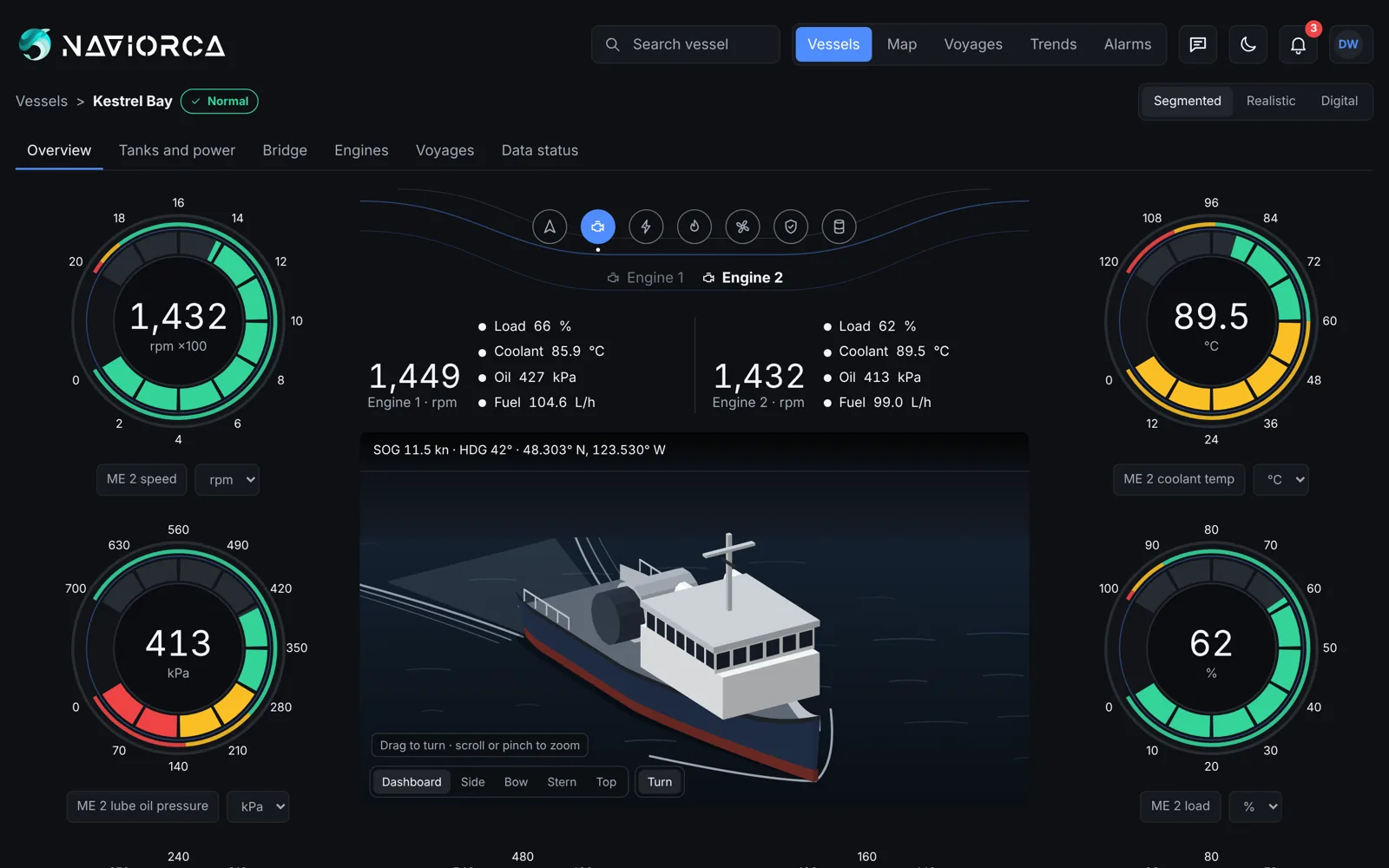
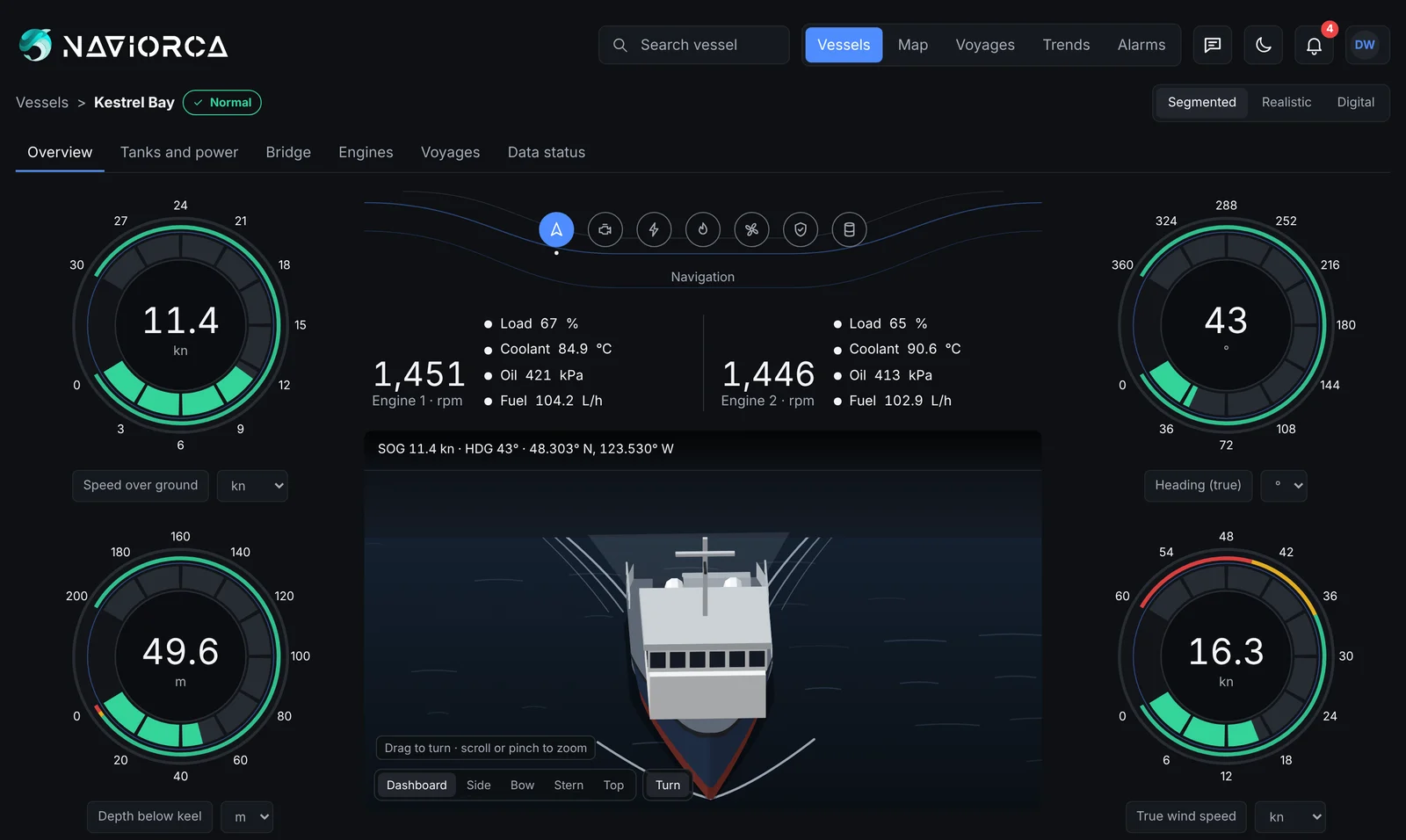
The Navigation page shows what the wheelhouse sees: speed over ground, heading, depth below the keel and wind around a live view of the vessel, with both engines alongside. Each vessel has its own dashboard pages for navigation, main engines, generators and electrical, tanks, and safety and bilge.
- Speed, heading and course, position, depth and wind
- Compass, echo sounder, wind and rudder-angle gauges
- Voyages recorded with track, speed, fuel and conditions
- Dashboard pages for every system on board
Gauges and signal mapping
Raw signals in, named gauges out.
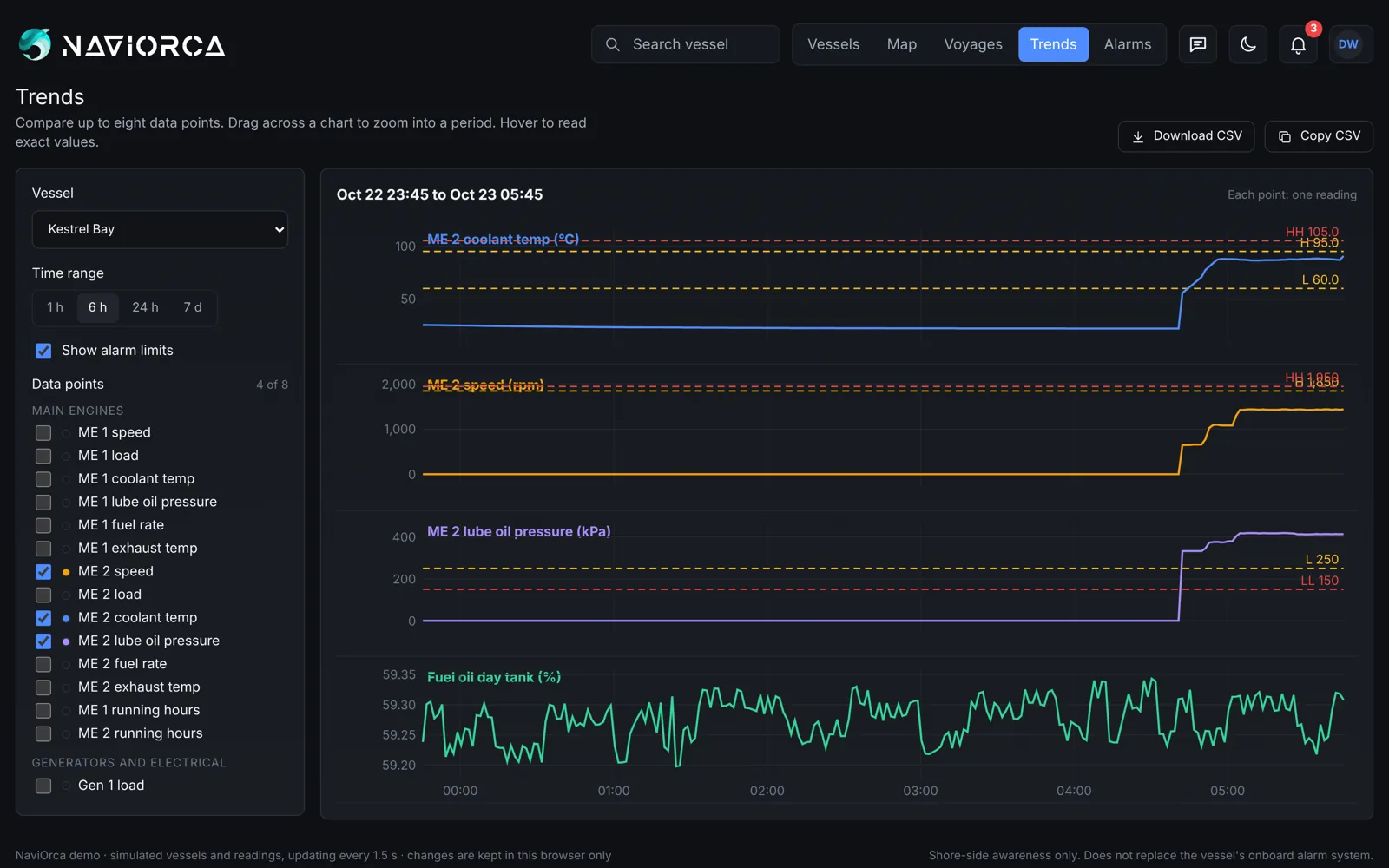
Vessel networks speak in parameter numbers. NaviOrca maps each one to a gauge your team recognises, with the right unit and the limits for that equipment, shown on dashboards built from 16 gauge types.
- J1939 SPNs and NMEA 2000 PGNs mapped to named gauges
- Scale, offset, units and limits per tag
- Templates, mapping import and copy to sister vessels
- Trends of up to eight signals, with CSV export
Alarms
Know before the vessel calls.
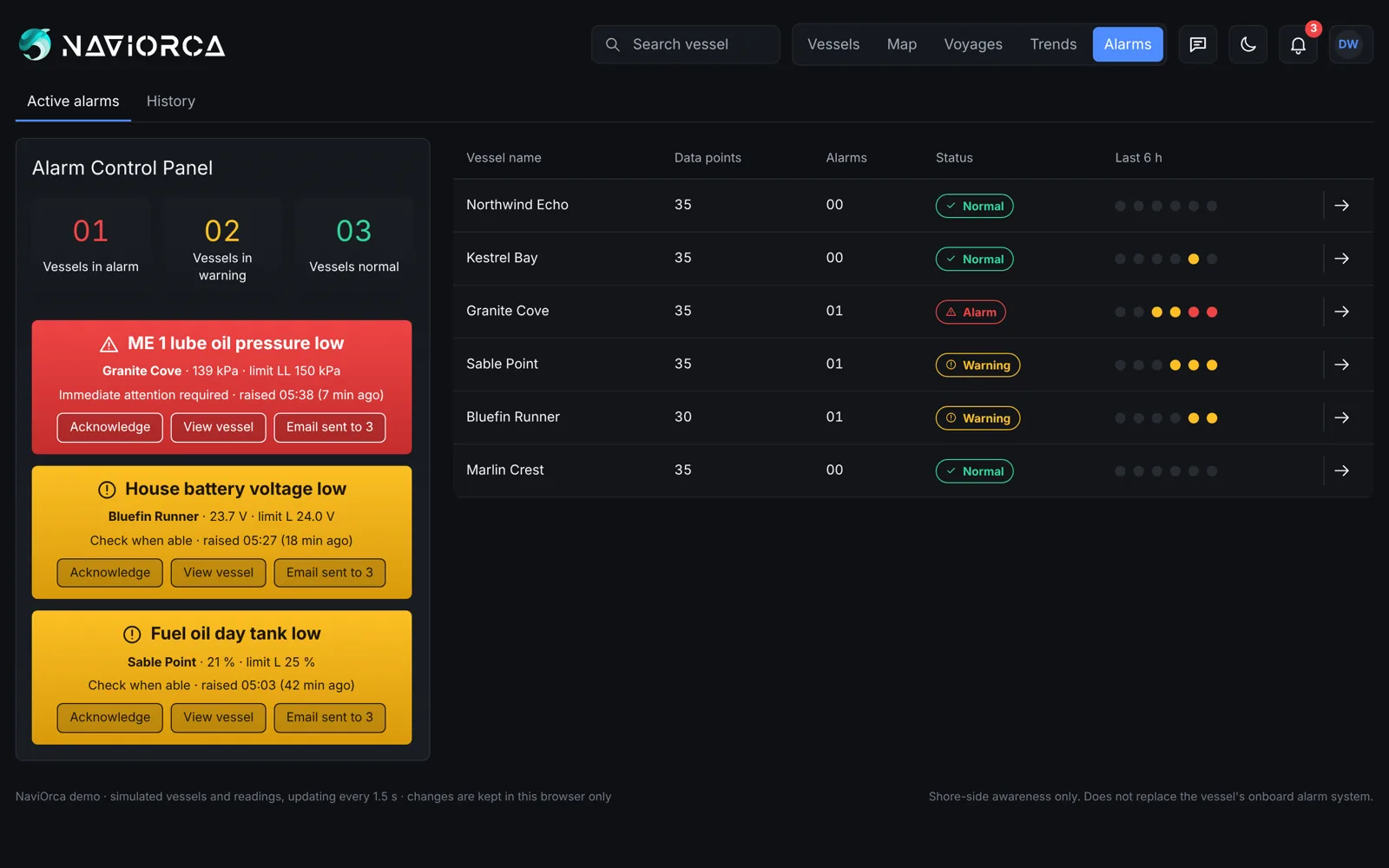
Each gauge can have four limits, from low-low to high-high, with a delay and a deadband so one spike does not flood your inbox. If a vessel or one of its data sources stops reporting, that is an alarm too.
- Low-low, low, high and high-high limits
- Vessel offline and data-source offline alarms
- Emails grouped, with an optional all-clear
- Acknowledge with a comment; alarm history with CSV export
Fleet and companies
One fleet view. Each owner sees their own.
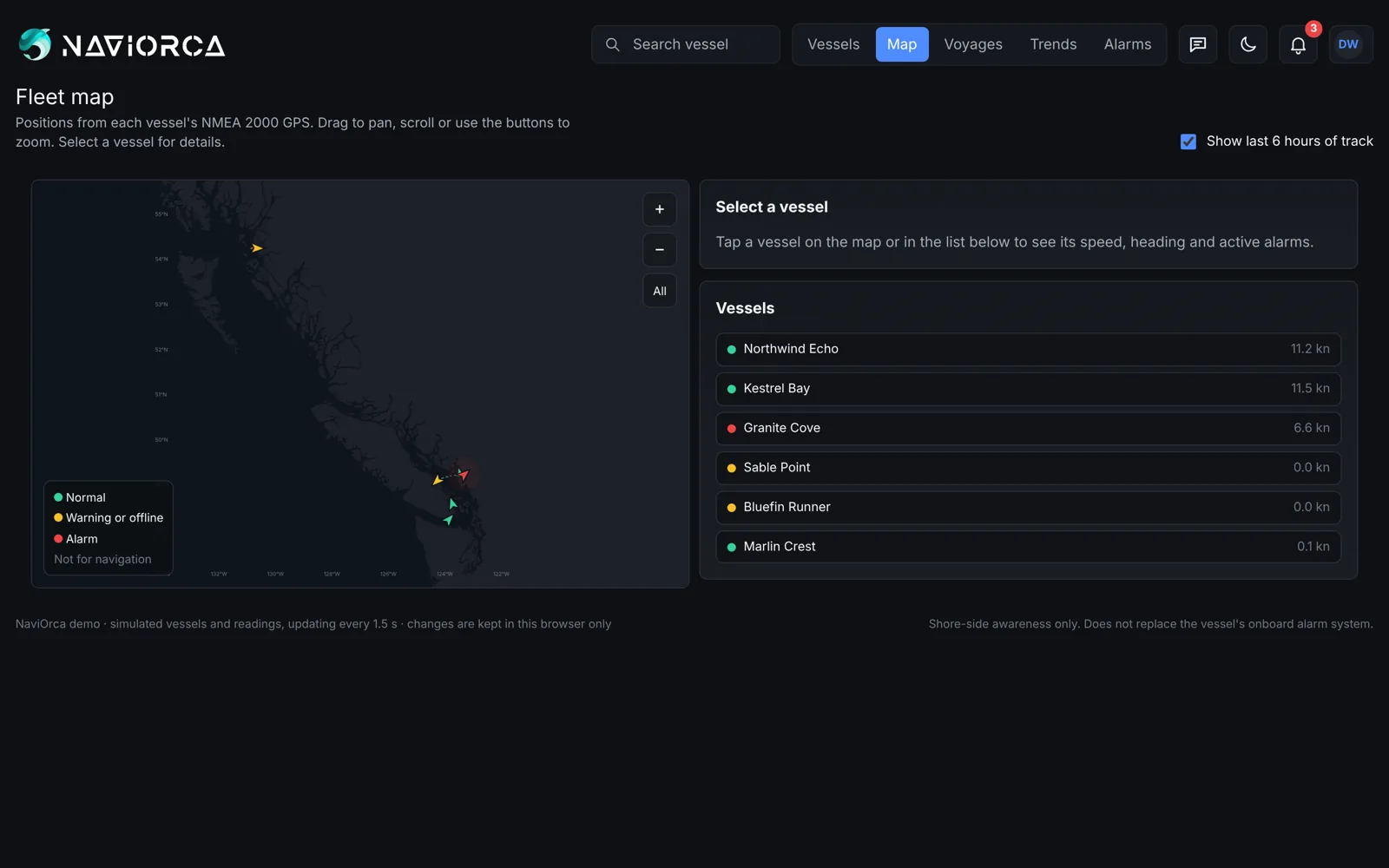
See every connected vessel at once on a list and a map, then open one to its engine room. Each client company has its own space, with five roles from company lead to viewer, two-factor sign-in and an activity log.
Standalone
Its own product, for any fleet.
NaviOrca does not need Oceanaut or any other Albatross Marine product. It is built for owners, managers and service companies who want their vessels' data ashore, whatever they use for fleet management and whatever is already fitted on board. A connection to Oceanaut is something we are considering for later.
See Oceanaut →Later
Coming next.
Mobile app
NaviOrca on iOS and Android, with push notifications for critical alarms alongside email.
Ask NaviOrca
Ask questions about a vessel's engine data in plain language and get an answer drawn from it.
Questions engineers ask.
What is NaviOrca?
NaviOrca is remote vessel monitoring for fleets, built by Albatross Marine. It brings navigation, engine, power, tank and safety data ashore, with live gauges, alarms, voyages and trends.
Can I use NaviOrca today?
Yes. Book a demo and we will walk through your vessels, what to connect and getting your first vessel on screen.
Do I need new hardware on board?
Not always. If a vessel already has a monitoring, alarm or telematics system with an API, NaviOrca can take its data from there. Otherwise a compact logger connects to the vessel's SAE J1939 engine network and, where fitted, its NMEA 2000 network. We confirm the best route for each vessel during the demo.
Is NaviOrca part of Oceanaut?
No. NaviOrca is a standalone product from Albatross Marine and does not need Oceanaut. A connection between the two is something we are considering for later.
How are alarms sent?
By email to the people assigned to each vessel, with repeats grouped together and an optional email when an alarm clears. Push notifications for critical alarms are planned with the mobile app. NaviOrca does not send text messages.
See your vessels from shore.
Book a demo and we will show NaviOrca running on sample vessels, then plan what to connect on yours.
Book a demo